


Font Keyboard: Text Fonts+
3.8957.00 Reviews
App Specs
- Version
- 6.6.37
- Updated On
- License
- Free
- Downloads
- 10,000,000+
- Developer
- Fonts, Emojis & Symbols Studio
- Categories
- Personalization
- Platform
- Android, iOS
Screenshots
 Analysis by AppCompare
I tend to notice a keyboard app most when it gets in the way: a slow switch, a missed tap, or a style that looks different once a message is sent. With Font Keyboard: Text Fonts+, the appeal is more playful than technical. It gives everyday typing a visual twist, and it is best approached as a creative extra rather than a replacement for every keyboard habit. I’d try it if I wanted messages and social posts to feel more personal, while keeping a regular keyboard available for moments when plain, predictable typing matters more.
What to expect from everyday speed
A font keyboard adds an extra choice to typing: pick a look, then decide where that text belongs. That makes the experience feel quickest when I settle on a style for a particular conversation or post instead of browsing every time I open the keyboard. Previewing options is useful for that first decision, but switching styles repeatedly can interrupt a fast exchange. My practical tip is to choose one readable favorite for daily use and treat the more decorative styles as occasional accents.
The app is a free personalization tool from Fonts, Emojis & Symbols Studio. It has a 4.0 average from around 70,000 ratings, and has passed 10 million installs. Those figures suggest it has found an audience, but they don’t guarantee that every font will suit every person or app. I’d judge it by whether its styles look good in the places I actually write, not by popularity alone.
When typing gets busy
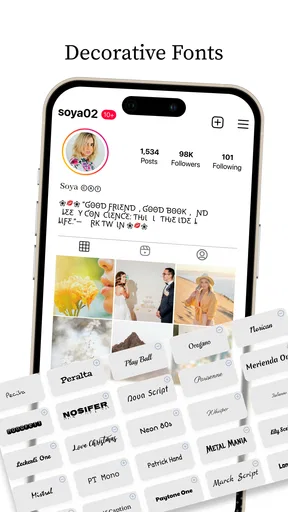
The most useful workflow is to separate composing from decorating. For a short greeting, caption, or profile line, I can choose a style and see how it feels before sending. For a longer message, I’d write for clarity first and use a decorative font only for a name, opening, or brief emphasis. That keeps the message easy to scan and avoids turning a whole paragraph into a visual puzzle.
There is also a practical trade-off when a message leaves the app: stylized characters can be less familiar to read than standard letters, and the recipient’s device or service may not present every style exactly as I expect. I wouldn’t use an ornate font for directions, a work instruction, or anything where a quick, unambiguous read matters. A plain keyboard remains the safer choice for those situations.
Reliability is about the destination too
Because the keyboard is meant to work across different places where people type, the real test is not just selecting a font; it is checking the result in the destination app. I’d send a short test to myself before using an unfamiliar style in a public bio or an important post. This small check can catch a look that feels cramped or harder to read on another screen, without requiring a complicated setup.
For casual chats and social posts, that extra check is usually a reasonable exchange for more expressive text. For accessibility, consistent rendering, or long-form writing, I’d favor standard text and the built-in keyboard instead. This is a visual customization app, not a reason to sacrifice legibility or dependable editing.
Worth Reading Before You Choose

EA SPORTS FC Mobile 26 Is a Bigger Football Game, but It Takes Time

Flipboard Shows What News Apps Must Do Beyond the Feed

Switching to Android Auto Means Rethinking Your Driving Routine

Google Calendar Makes a Crowded Week Easier to Manage

Ludo King Makes the Most of the Minutes Between Plans

Baby Panda World Brings Quick Play to Modern Phones, but Its Game Library Feels Busy
Device fit and setup
Font Keyboard: Text Fonts+ is listed for devices running Android 6.0 or later, and the app is rated for Everyone. The current version is 6.6.37. It is free to start, with in-app purchases ranging from $0.99 to $40.99 per item, so I’d explore the free experience before deciding whether any paid option is worth it. It was released on July 28, 2020, and its long run has brought it to a sizeable audience, but I still wouldn’t assume that setup feels identical on every device.
Keyboard setup asks you to follow the on-screen steps and enable it as an input option. I’d take a moment to read those prompts carefully and switch back to my usual keyboard if anything feels unclear. A custom keyboard is a more personal part of a phone than a wallpaper, so comfort with the setup matters as much as the font selection. If I only want a one-off decorative caption, copying text from a separate styling tool may be a better fit than changing keyboards.
Who will get the most from it
I’d recommend it to people who regularly add personality to short messages, social captions, or profile text and enjoy choosing a visual style to match the mood. It is less compelling for someone who mainly writes long emails, values uniform plain text, or wants a keyboard that disappears into the background. A built-in system keyboard is usually the simpler alternative for reliable everyday typing; a dedicated text-style tool can suit someone who only needs an occasional flourish.
A realistic use might be a friend planning a birthday message while waiting for a bus. They could use a distinctive style for the recipient’s name, keep the actual plans in ordinary text, and check the message before sending. That balance gives the note a personal touch without making the important details harder to understand. The same approach works for a short social caption: decorate a few words, not every line.
A Splash of Personality
So, what’s the deal with Font Keyboard: Text Fonts+? Basically, it’s an app that lets you customize the fonts you use across different platforms. Whether you’re texting your bestie or updating your social media status, this app lets you express yourself in fonts that scream you.
Features That Stand Out
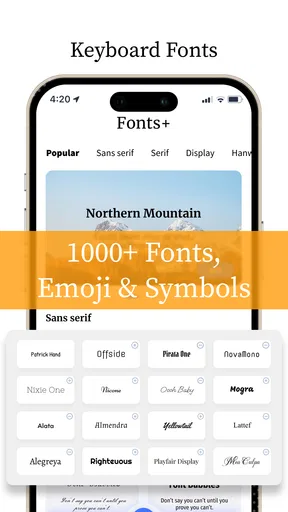
One of the coolest things about the app is its variety. We’re talking about hundreds of fonts at your fingertips. You can go from classy serif to quirky handwritten styles with just a few taps. It’s like having the power of a type designer in your pocket.
And if you’re worried about getting lost in the sea of options, don’t be. The interface is super user-friendly. You can easily swipe through the fonts and preview them in real-time. Simple, right?
Easy Peasy Installation
Getting started with the app is a breeze. Once you’ve downloaded it, setting it up is straightforward. Just follow the on-screen instructions to enable the keyboard, and you’re all set. It’s compatible with both Android and iOS, so you’re covered no matter what device you’re rocking.
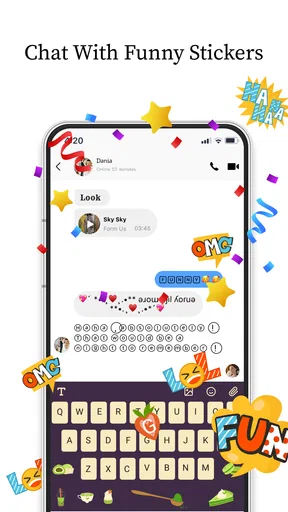
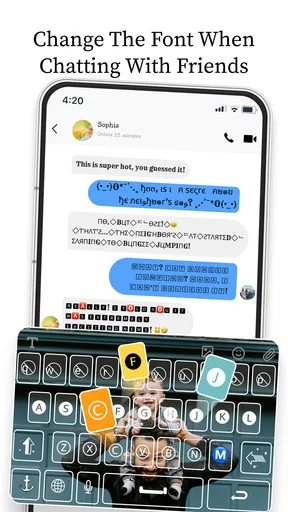
Plus, the app integrates seamlessly with all your favorite messaging apps. Whether you’re on WhatsApp, Instagram, or just the regular ol’ text messages, your fonts will follow you everywhere. It’s like having a personal stylist for your words.
Express Yourself
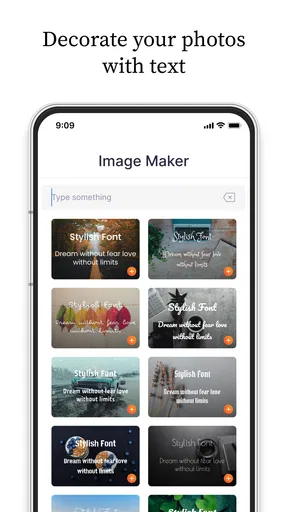
What I love most is how the app lets you express who you are. Want to add a touch of elegance to your messages? Go for a cursive font. Feeling a bit playful? Choose something fun and whimsical. It’s amazing how a simple font change can set the tone of your conversation.
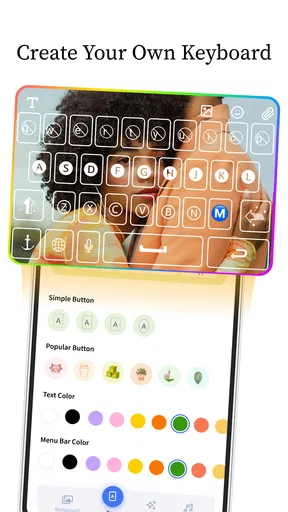
Not to mention, you can even create your own font styles if you’re feeling particularly creative. The customization options are endless, and it’s a fun way to put your personal stamp on everything you type.
Keep It Fresh
If you’re the type who loves to keep things fresh, the app frequently updates its font library. You’ll always have access to new styles, keeping your texts as trendy as you are. Plus, it’s great to have options that evolve with your mood and the latest trends.
Why You’ll Love It
In a world where everyone is texting, standing out is a big deal. This app gives you that edge, allowing you to communicate in a way that’s uniquely you. Whether you’re looking to impress someone special or just want to have some fun with your texts, you’ve got all the tools you need.
And let’s be honest, who doesn’t love a bit of customization? It’s like when you find the perfect phone case or wallpaper. It just makes everything feel a bit more, well, you.
Final Thoughts
At the end of the day, Font Keyboard: Text Fonts+ is a fantastic addition to any smartphone. It’s fun, it’s easy, and it makes your messages stand out. If you’re looking to add a splash of personality to your digital conversations, this app is definitely worth a download.
So, go ahead and give it a try. You might just find that changing your font is the best way to express exactly who you are.
Pros
- Wide variety of font styles available.
- Easy integration with social media apps.
- User-friendly interface for quick access.
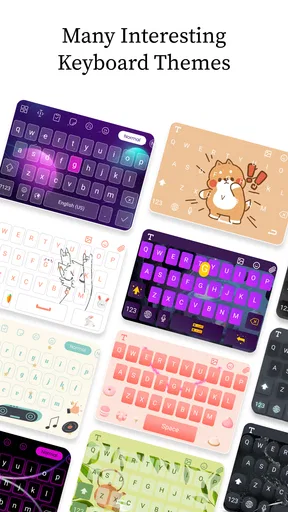
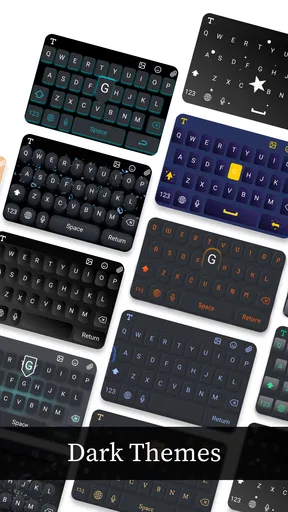
- Customizable keyboard themes.
- Supports multiple languages for versatility.
Cons
- In-app ads can be disruptive.
- Some fonts require premium purchase.
- Occasional lag on older devices.
- Limited free font options.
- Regular updates can be large.
FAQs for Font Keyboard: Text Fonts+
What is Font Keyboard: Text Fonts+ and how does it work?
Font Keyboard: Text Fonts+ is a customizable keyboard app that allows users to personalize their typing experience with a variety of unique fonts and emojis. It integrates seamlessly with your device's keyboard, enabling you to use different fonts across various apps such as messaging, social media, and email. Simply download the app, enable the keyboard in your settings, and start typing with style.
Is Font Keyboard: Text Fonts+ compatible with all devices?
Font Keyboard: Text Fonts+ is designed to work with both Android and iOS devices. However, it's important to check the app's compatibility with your specific device model and operating system version. Some older devices or OS versions may not support certain features, so ensure your device meets the app's requirements for optimal performance.
Does Font Keyboard: Text Fonts+ offer free fonts, or are they all premium?
Font Keyboard: Text Fonts+ offers a selection of both free and premium fonts. Users can access a variety of fonts at no cost, but for exclusive designs and additional customization options, a premium subscription or one-time purchase may be required. This allows users to choose according to their preference and budget.
How does Font Keyboard: Text Fonts+ handle user privacy and data security?
Font Keyboard: Text Fonts+ prioritizes user privacy and data security. The app requests necessary permissions to function properly, such as access to your keyboard settings, but it does not collect personal information or store any sensitive data. Users are encouraged to review the app's privacy policy for detailed information about data handling practices.
Can I use Font Keyboard: Text Fonts+ in all my apps?
Yes, Font Keyboard: Text Fonts+ is designed to work across most apps that support custom keyboards. This includes popular social media platforms, messaging apps, and email clients. However, some apps may have restrictions or limitations on third-party keyboards, so functionality might vary depending on the app's specific policies and capabilities.


